PRINTING & PAPER CRAFTS
How to Print and Cut Halloween Bookmarks at Home
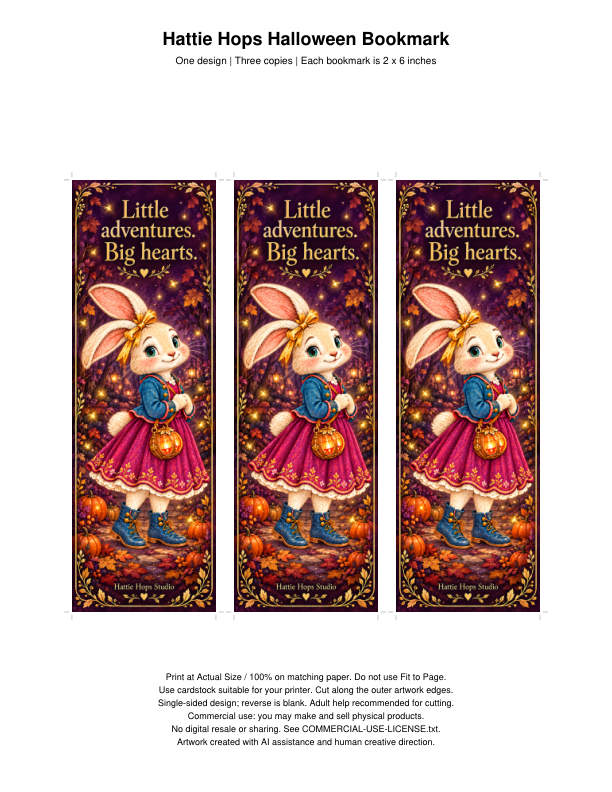
To make a Hattie Hops bookmark at its intended size, open the PDF that matches your paper, print at Actual Size or 100%, and trim one test copy before printing more. The finished design is 2 × 6 inches.
Choose the file that matches your paper
The Hattie Hops printable bookmark includes two one-page PDFs: one for US Letter and one for A4. Both contain three copies of the same design. They are paper-size options, not six different bookmarks.
Use the purchased PDF rather than a screenshot or a website preview. Keep the original file in a folder you can find again. If your paper tray contains US Letter, choose the Letter version and confirm that size in the print settings. Use the A4 version with A4 paper.
Print one test at the intended size
- Open the selected PDF in a reader with a print control.
- Choose the correct printer and paper size.
- Select Actual Size or 100% scale. Turn off Fit to Page or other automatic resizing for this bookmark.
- Print one sheet and measure a bookmark before trimming the rest.
If the result is smaller than 2 × 6 inches, revisit the scaling and paper-size settings. If something is clipped, check the printer's supported printable area and the selected file. Settings vary, so a test sheet is more useful than assuming every printer uses the same defaults.
Pick paper your printer can handle
Cardstock can make a sturdier bookmark than ordinary office paper, but check your printer's supported paper type and weight before loading it. A plain-paper test is an easy way to check size and placement first. Let the printed sheet dry before handling or finishing it.
Expect some difference between screen and printed color. Printer settings, ink and paper all affect the result. Judge the test under ordinary reading light before making several copies. The bookmark has a single-sided design and a blank reverse.
Trim, then finish simply
An adult can trim the three bookmarks with suitable scissors or a paper trimmer. Keep cutting tools out of reach of young children. Check the first finished piece against the printed design before cutting a stack.
A ribbon or protective finish is an optional craft addition you supply yourself. No physical bookmark, tassel, ribbon or other material is included in the digital download. If you add a hole, leave enough room around it so the paper does not tear immediately.
Make a small reading ritual
Invite your child to place the bookmark where you stop reading and choose one moment to talk about next time. You could pair it with Hattie Hops and the Halloween Dragon for a cozy personal use storytime, or with a favorite book you already own.
For a gift, write a short message on the blank reverse. A simple “I saved you a little adventure” turns the bookmark into a thoughtful note without needing another template.
For another easy activity, try a gentle Halloween coloring and reading table.
Created by Marchelle Cook for Hattie Hops Studio. Meet the creator and the storybook world.